👋 TL;DR for Founders & Team Leads
Hi, friends. Chip here. Paper’s GPU shaders replace After Effects for animated logos, UI buttons, and backgrounds—zero custom code. These are ready-made, parameter-driven effects that you design visually inside Paper and export straight into React or vanilla JavaScript. Open the left side panel, click “Shaders” (or press S), and pick an effect. Below are five real UI interfaces I took from flat to alive with it, plus one community tool worth knowing about.
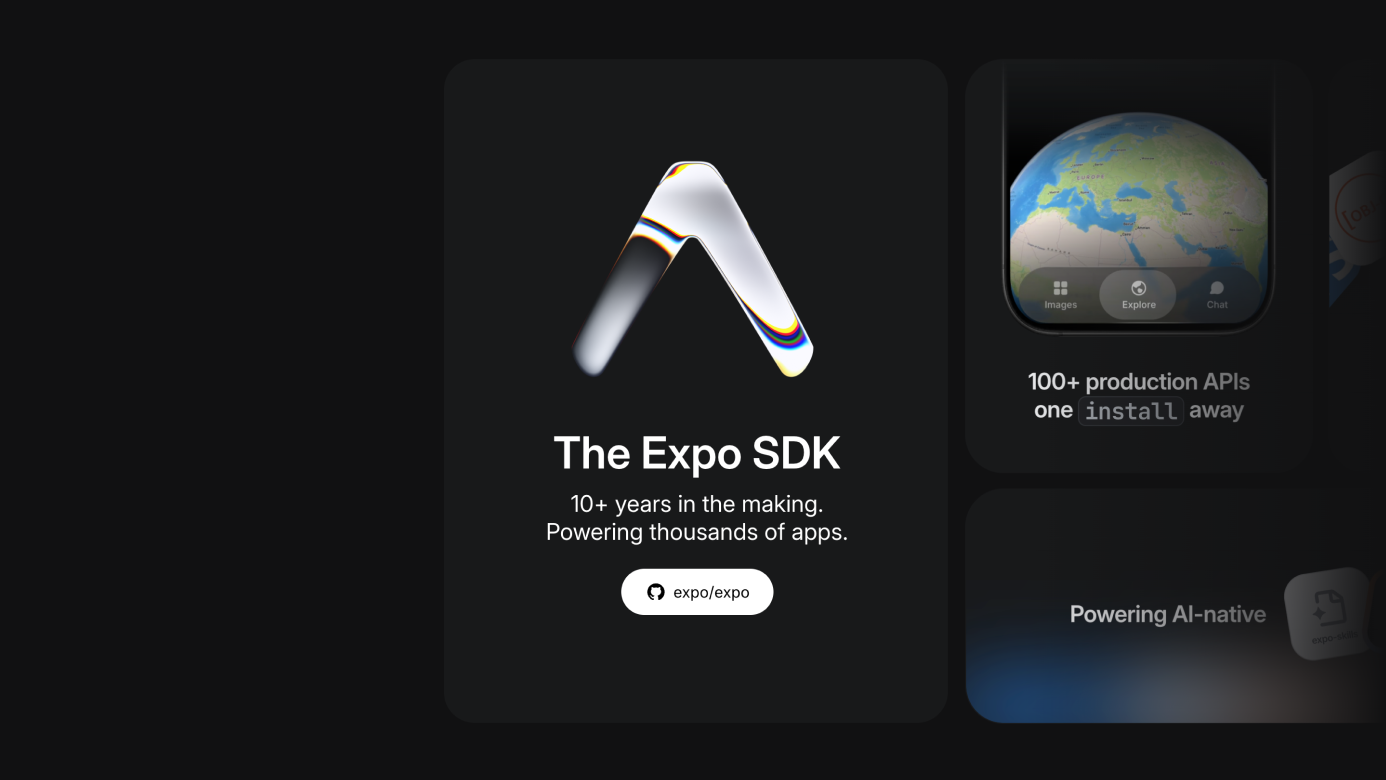
Animated Logo for a Bento Grid
First up: the animated Expo SDK logo from a bento-grid section on Expo.dev. I applied Liquid Metal, pasted in the Expo logo SVG, and worked through the parameters one by one: Repetition for how often the pattern repeats, Contour for how the animation reacts at the edges, Distortion, Softness, Angle, Red Shift and Blue Shift for color, Speed, and Scale.
The one wrinkle: getting the logo’s two-tone look right meant duplicating the shader layer—one Liquid Metal instance for the fill, a second, resized and recentered on top, for the rest of the mark. Two layers, same shader, different settings.
Three-Layer Animated Footer
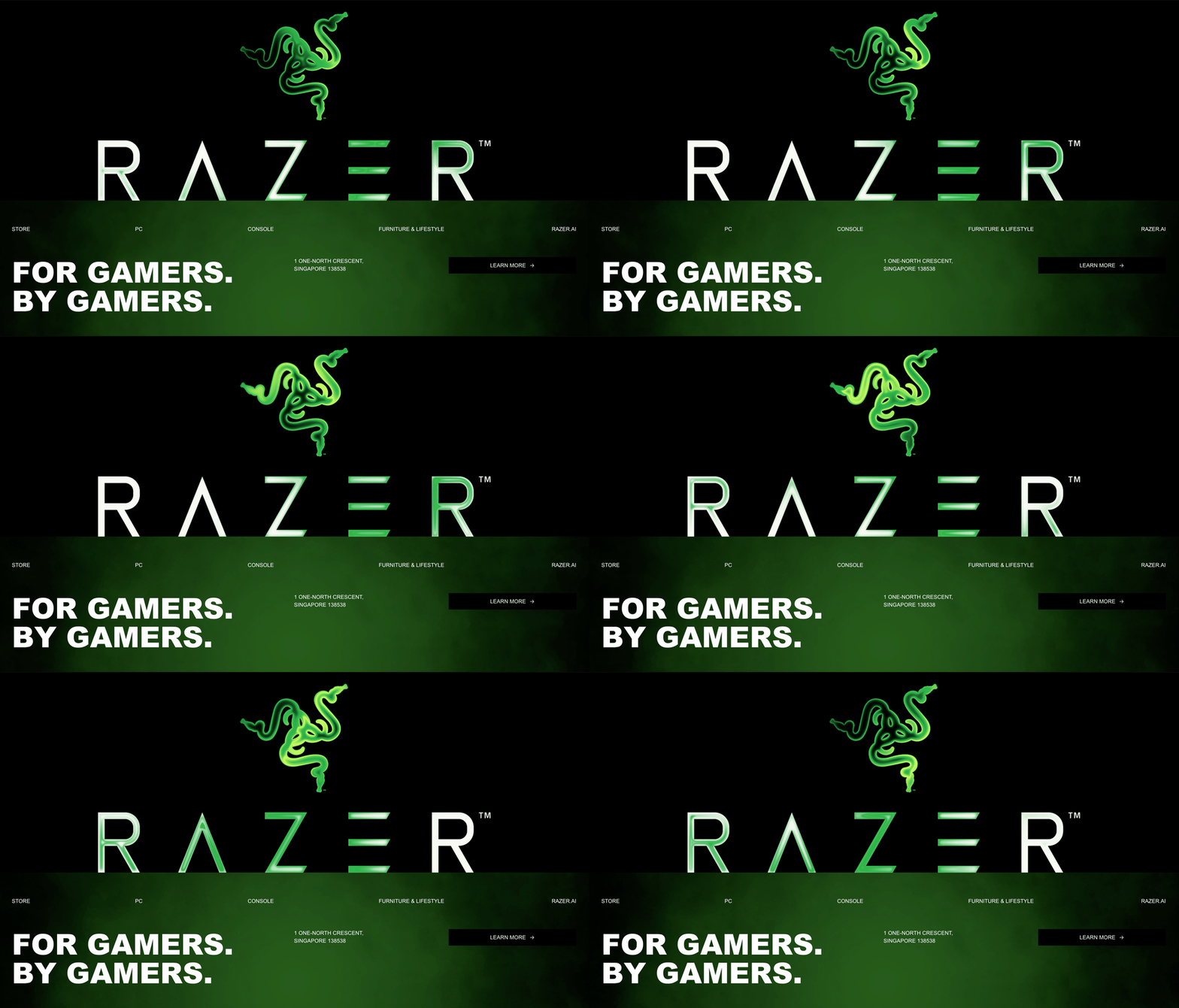
Next: a hypothetical Razer footer, rebuilt as three separate shader layers stacked on top of each other.
The logo. Applied Gem Smoke to the Razer logo SVG, set the colors to white, light green, and dark green (I had them in the wrong order at first), then tuned speed, angle, and inner glow. Framed and clipped to fit.
The wordmark. Same shader, same color values, applied to the wordmark SVG instead: outer distortion at 100%, inner distortion at 67%, inner glow at 61. Framed and placed above the logo layer.
The smoke. The animated haze at the very bottom uses Smoke Ring: black fill, green foreground, enlarged and repositioned to the bottom edge, with radius, noise, and iteration count tuned until it read as atmosphere rather than static texture. Reordered in the layer stack so the text above it stays legible.
Three shaders, one cohesive footer.
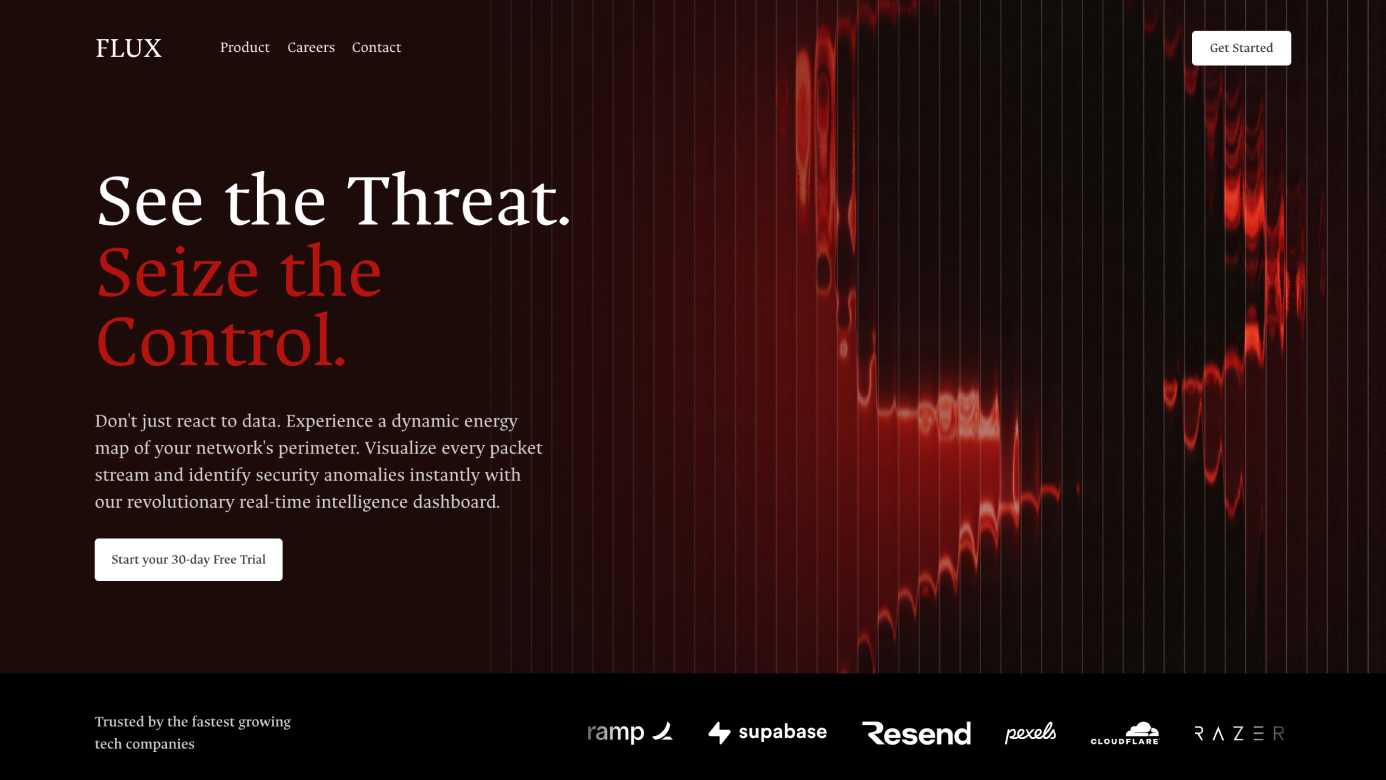
Mysterious Hero Section Background
For a hero section background, I started with a cinematic silhouette photo by Miguel Angel Cruz Manzueta and applied Fluted Glass. The shape defaults to vertical lines (Irregular Lines and Waves are also options), and the setting that mattered most was Size: wider gaps between the lines made the image feel more dynamic instead of dense. From there: Highlight and Shadow to make the lines read clearly, a slight Angle and light Distortion, a small Shift, and enough Blur to soften the edges.
Last step: a left-to-right gradient overlay above the image layer, so the text sitting on top of it stays readable.
Bonus: A Community Shader + UI Kit Tool
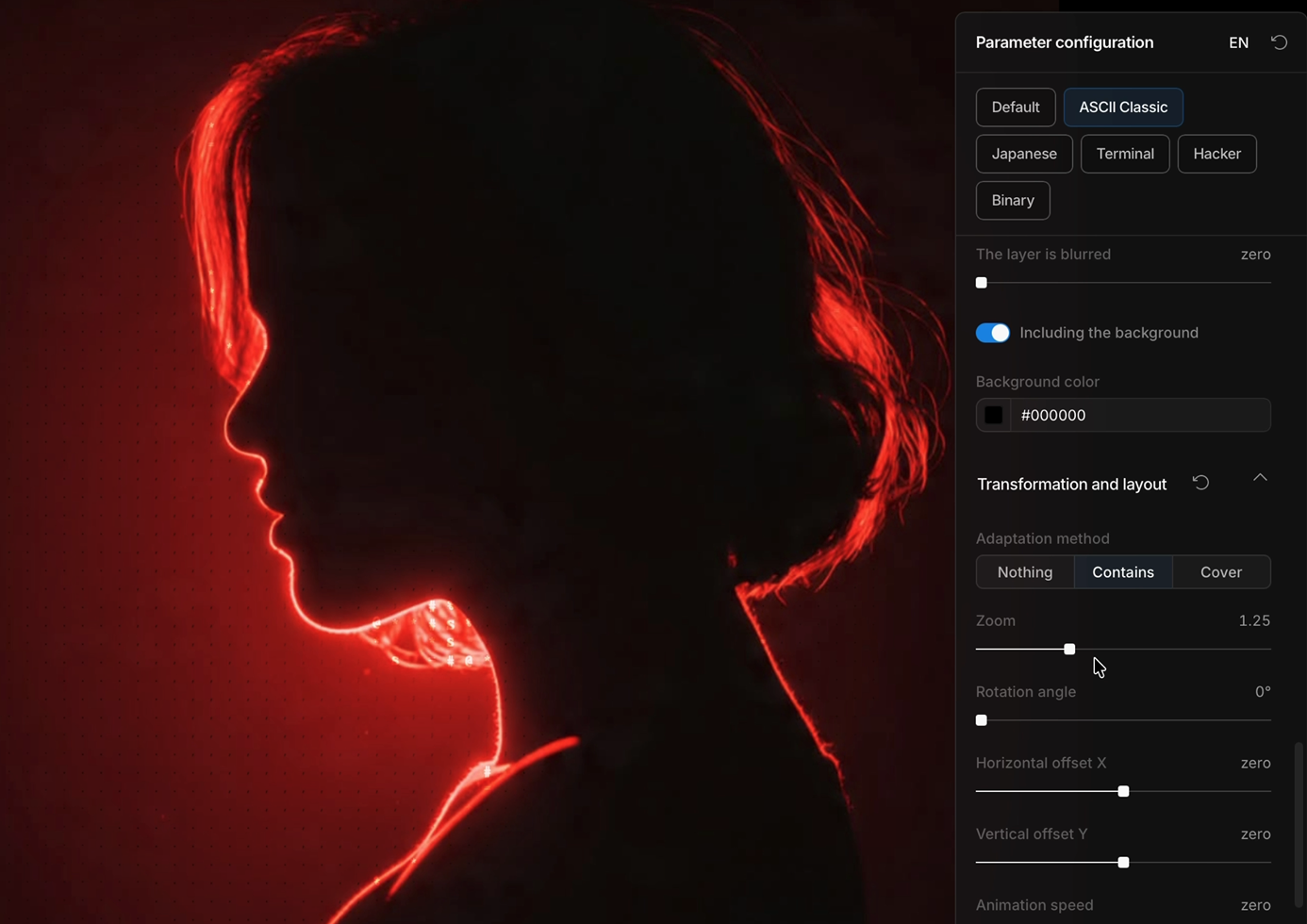
Worth a mention before the last two builds: a full-screen shader preview and UI kit tool built by Paidax (@xin_pai88825), combining Stephen Haney’s open-source Paper Shaders with Alex Barashkov’s UI component library. It lets you upload a logo and preview it with any shader instantly. Inside it, I used the ASCII Art effect on the same hero photo—adjusting size, density, exposure, uniformity (numbers vs. classic character sets), scatter, and fuzziness—for an alternate, grittier version of the same background. Same source image, two completely different textures depending on which shader you reach for.
Pulsing-Glow AI Agent Button
Inspired by a button design shared by Tran Mau Tri Tam (@tranmautritam): a circular AI-agent trigger with a soft glow and a pulsing border. Built from four stacked layers:
- Base glow. Liquid Metal, shape swapped to Circle, sitting behind everything else.
- Backdrop. A full-radius rounded rectangle at roughly 70% gray fill, with backdrop blur (not layer blur) applied so the glow beneath it reads as soft light rather than a blurred image.
- Sparkle icon. A sparkle SVG with a shader applied, fill removed, color count reduced, and the glow constrained to the icon’s own shape so it doesn’t bleed past its edges.
- Pulsing border. Fill removed, foreground set to white, thickness and roundness reduced for crispness, then duplicated as a second layer for a more realistic circling-light effect around the outside.
Four shader layers, one button that looks like it’s thinking.

Halftone Background for a Sign-Up Page
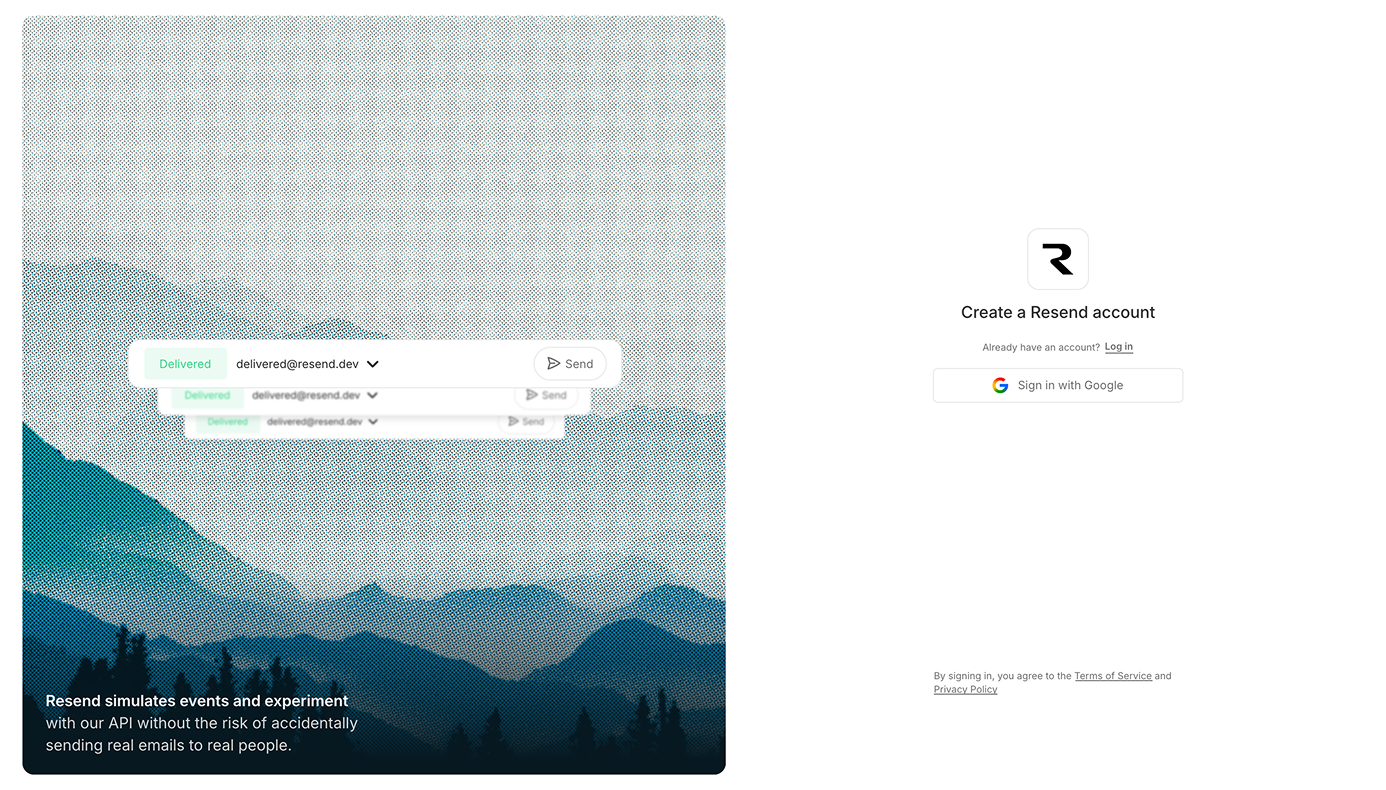
Last one: a plain sign-up page background, replaced with a mist-covered mountain photo by Mehmet Turgut Kirkgoz via Pexels run through Halftone CMYK. The parameters that did the most work were Dots, Ink, and Sharpness, plus Grid Noise for extra texture. I pulled back the red and green channel gain to keep the color from overwhelming the UI, tried the Drops and Newspaper pattern variants, and landed back on Default. A bottom gradient overlay keeps the sign-up form legible over the textured background.

What this changes about your design workflow
Replaces hand-written WebGL for common UI texture workNoise, liquid metal, smoke, halftone, fluted glass—these normally mean an engineer writing and tuning a fragment shader. Here they're sliders, exported directly to code you can drop into a real codebase.
Turns a static logo or photo into a living asset in minutesPaste in an SVG or a photo and the shader wraps around it. The Expo logo, the Razer wordmark, a hero photo—each went from flat to alive without a separate motion pass or After Effects.
One tuned preset, reused everywhereThe same Liquid Metal settings I dialed in for the bento-grid logo came back, almost unchanged, for the AI-agent button's circular glow. Once you've found values that look right, they transfer across projects fast.
Doesn't replace layout and color judgmentEvery showcase still needed manual layer ordering, framing, clipping, and color values pulled from an existing brand palette. The shader generates texture. It doesn't decide composition.
Exported code is a starting point, not a drop-in componentWhat comes out of Paper is real React or vanilla JS, but it still needs to be wired into your actual component structure, sizing, and state. Treat the export as the shader logic, not the finished integration.
Try It Yourself
Everything you need to reproduce these:
- Paper—press S or click “Shaders” in the left panel
- Effects used above: Liquid Metal, Gem Smoke, Smoke Ring, Fluted Glass, ASCII Art, Halftone CMYK
- Community shader preview + UI kit tool by Paidax—upload any logo and preview it with any shader instantly

Get the 5 Paper templates + source assets
Links to all 5 Paper.design showcases, parameters already dialed in to match the video, plus every original SVG and background image used to build them. Free.
My honest take: none of these needed a shader background to function. What the shader adds is the difference between a UI that works and one that feels considered. Once you’ve tuned a preset you like, reusing it on the next project is a copy-paste, not a rebuild.
Let me know in the comments what UI you’d apply shaders to next.
Download the templates and source assets
Links to all 5 Paper.design showcases with the exact parameters already set, plus the original logo SVGs and background images used across every build. One download, free.
Frequently asked questions
No. Every effect in this video was built entirely with sliders and color pickers inside Paper. The only code involved is what Paper generates for you on export.
Yes. Paper exports the shader as real code you can drop into React or plain JavaScript. You'll still need to wire it into your own component sizing and structure, but the shader logic itself is generated for you.
A full-screen shader preview and UI kit tool built by Paidax (@xin_pai88825), combining Stephen Haney's open-source Paper Shaders with Alex Barashkov's UI component library. It lets you upload a logo straight in and preview it with any shader—including the ASCII Art effect shown in the video, with controls for density, exposure, scatter, and fuzziness.
The download box on this page sends you two things by email, free: links to all 5 Paper.design showcases with the exact parameters already dialed in to match the video, and every original source asset used to build them—logo SVGs (Expo, Razer, Razer wordmark, sparkle) and background images. Photo credits: the hero background (cinematic silhouette in neon light) is by Miguel Angel Cruz Manzueta; the mountain photo used for the sign-up page is by Mehmet Turgut Kirkgoz, via Pexels.
Workflow version: July 28, 2026. Built entirely in Paper (paper.design)—no code editor open until export. This log reflects the shader library and its parameters as of this build; presets may look or behave differently as Paper updates them.